Mynecraft: Family Minecraft Platform
A collection of services that power my family’s Minecraft experience: a control plane for spinning Bedrock worlds up on demand, and a browser-based skin editor for customizing characters.
MC Admin: Control Plane
I built MC Admin so my kids could hop between custom Bedrock worlds without renting third-party realms or waiting on me to hand-configure droplets, DNS, and LAN workarounds. The stack now spins servers up on demand, keeps costs down by auto-suspending idle hosts, and even bridges our living-room consoles into the action.
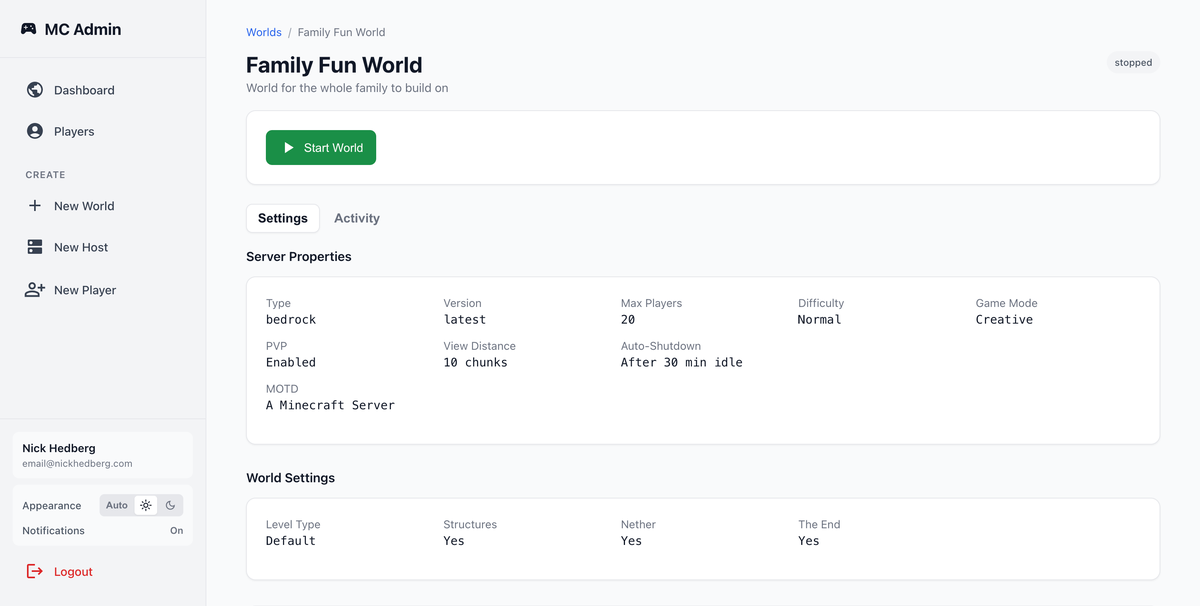
Overview
MC Admin is three services that cooperate:
mc-admin-api(Go) is the control plane that knows about worlds, hosts, DNS, DigitalOcean, and Spaces backups.mc-admin(Next.js 15) is the Auth0-protected dashboard the family uses to start/stop/share worlds.mc-admin-lan(Go) is a Raspberry Pi daemon that launches Phantom proxies so Xbox/Switch clients see the servers under “LAN”.
Together they let the kids tap “Start World”, wait a few seconds for the droplet + server container, scan a QR code, and get playing—no SSH, no surprise billing.
mc-admin-api: Orchestrating Worlds
The backend exposes a bearer-protected HTTP API plus future CLI mode for everything infrastructure:
- World lifecycle:
POST /worldsdefines minecraft_type/version/config, thenPOST /worlds/{id}/startplaces it on a host; stopping uploads data back into Spaces so storage is cheap when idle. - Host pool management: Each DigitalOcean droplet runs 3–4 servers. Hosts carry region, slot counts, and status so the scheduler can find capacity or tell me to provision manually.
- Networking & DNS: Every running world gets
{name}.mynecraft.worldwith ports allocated per edition (Bedrock 19132–19135 UDP, Java 25565–25568 TCP). - Auto-idle protection: Two background tickers handle pings and housekeeping. The ping loop (30s) uses RakNet to watch player counts and updates
last_player_activity. The housekeeping loop (60s) enforcesidle_threshold_minsper world andAUTO_HOST_IDLE_MINSfor empty hosts, shutting things down before DigitalOcean bills rack up. - Secrets & knobs: Env vars like
MC_ADMIN_MK,DO_TOKEN,MC_ADMIN_API_SSH_PRIVATE_KEY, andMC_DOMAINkeep auth + provisioning secure, whileHOUSEKEEPING_INTERVAL_SECONDSandAUTO_HOST_IDLE_MINStune aggressiveness.
Because everything emits structured operation logs (server-sent events), the UI can stream Docker output line-by-line so the kids see when “Downloading Bedrock image…” flips to “Server ready”.
mc-admin: Auth0 Dashboard
The frontend is a Next.js 15 app with Auth0 login that proxies all API calls through /mc-admin/api (lib/api.js) so browsers never touch master keys. A few highlights:
- Instant redirect:
pages/index.jswatches Auth0 state and bounces authenticated users straight to/dashboard, otherwise renders a simple hero with a “Sign In” CTA. - Real-time dashboard:
pages/dashboard.jspollsapi.listHosts()andapi.listWorlds()every 3 seconds, driving tabbed views with status badges, elapsed timers, and CTA buttons (“+ New World”, “+ New Host”). - World detail cockpit:
pages/worlds/[id].jsloads world + host inventory + latest operation in parallel, lets me pick explicit hosts, start/stop worlds, copy{fqdn}:{port}, display QR codes (components/ServerQRCode), and tail logs viaOperationLogswhen an action is running. - Guardrails: Delete/edit buttons disable while a server runs; no host? The UI links straight to
/hosts/new. Tabs sync to URL query params so refreshing stays on “Activity” when monitoring a start.
The dashboard design leans on badges, cards, and the elapsed timer hook so even non-tech family members can see “server is starting… 00:28” and know to grab snacks.
mc-admin-lan: Raspberry Pi Bridge
Bedrock consoles only see LAN broadcasts, so mc-admin-lan handles the Phantom proxy work:
MC_ADMIN_MK=<token> ./mc-admin-lan \
  --api-url https://<host>/mc-admin-api \
  --phantom-path /opt/phantom \
  --poll-interval 20s
- Built in Go with Make targets for arm64, armv7, and armv6 so I can drop binaries on any Pi from Zero to 5.
- Polls
/mc-admin-api/worldsevery ~20s, launches one Phantom per running world, and usesSO_REUSEPORTso multiple UDP 19132 listeners coexist. - Auto-downloads the right Phantom release into
~/.cache/mc-admin-lanunless I point it at a custom binary. - Respects
--bind,--bind-port-start, and--no-downloadflags, meaning a single Pi on the network makes every MC Admin world appear under “LAN Games” for local consoles.
Operating the Stack
- Local dev is simple:
go run main.gofor the API,next devfor the dashboard, andgo build ./cmd/mc-admin-lanfor the bridge. - Production is containerized on DigitalOcean; droplets get my SSH key via
MC_ADMIN_API_DO_SSH_KEY, and Spaces handles world archives so I can wipe hosts without losing progress. - Env consistency lives in Terraform (
mc-admin-api/terraform/) plus Dockerfiles for reproducible builds.
MC Skins: Skin Editor
A Next.js/React application for pixel-level Minecraft skin editing with real-time 3D preview and optional live collaboration.
Overview
Built for the Minecraft community (my kids and their friends), this editor allows users to create and modify Minecraft character skins directly in the browser. It combines a canvas-based paint interface with a live 3D viewer, and includes an experimental collaboration mode over WebSockets.
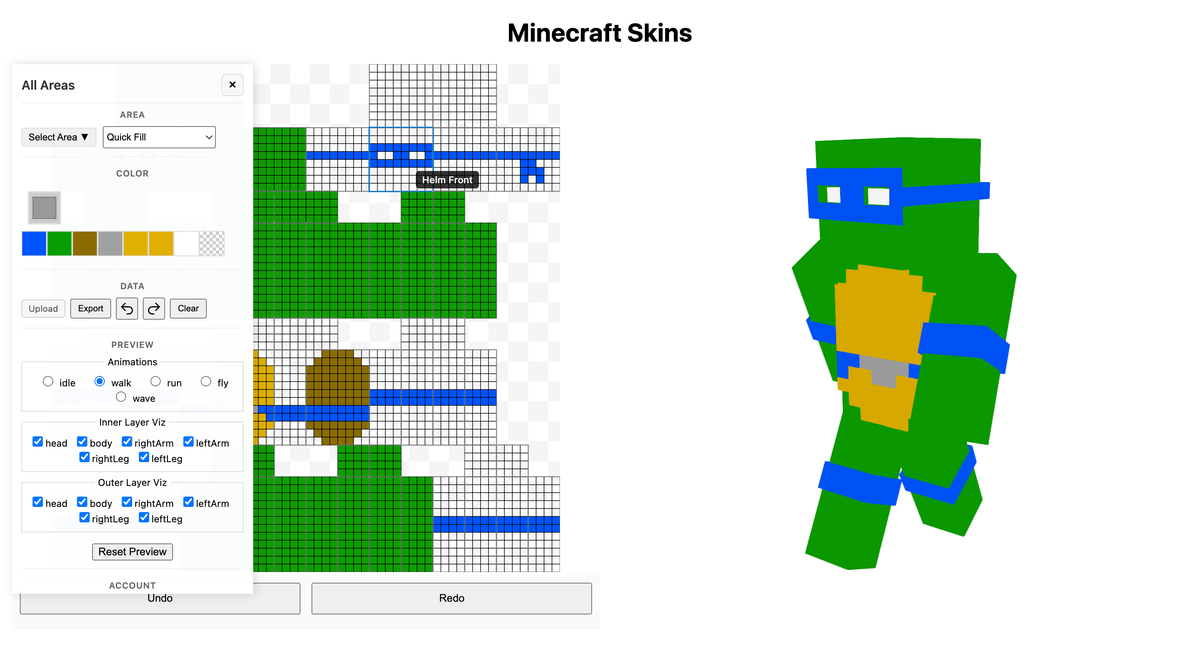
Key Features
Pixel Art Editor
- Canvas-Based Editing: Precise pixel-level control using HTML5 Canvas
- Area Isolation: Focus on specific body regions (head/arms/torso/legs and sides) while editing
- Color Controls: Palette + picker workflow for fast color changes
- Quick Fill: Fill grouped regions in one action
- Undo/Redo History: Local history stack for stepping backward/forward through edits
3D Preview System
- Real-Time Rendering: Live 3D character model updates as you edit
- Multiple Views: Front, back, sides, and rotating views of the character
- Animation Support: Character poses and walking animations
- Lighting Controls: Adjustable lighting to preview skin appearance in-game
Skin Management
- Save & Load: Persistent skin storage with user accounts
- Import/Export: PNG upload and export support (64x64 validation on upload)
- Per-User Library: APIs scoped to the authenticated user for listing/creating/updating skins
Technical Implementation
Canvas Architecture
components/PixelPainter/
└── index.js                 # Main canvas editor and paint interactions

components/Preview/
└── index.js                 # 3D viewer integration (react-skinview3d)

hooks/useSkinData.js         # Shared skin state, history, persistence, ws sync
components/EditControls/     # Upload/export/history/area controls
Pixel Manipulation System
The editor uses a layered canvas approach:
- Base Layer: Primary skin pixels (Steve/Alex model support)
- Overlay Layer: Additional details like jackets, hats, sleeves
- Preview Integration: Real-time texture mapping to 3D model
- Format Conversion: Automatic conversion between skin format versions
3D Rendering Pipeline
// 3D model system
const skinRenderer = {
  loadModel: (skinData) => { /* Parse Minecraft skin format */ },
  applyTexture: (canvas) => { /* Map 2D pixels to 3D surfaces */ },
  animate: (pose) => { /* Character animation system */ },
  render: (scene) => { /* WebGL rendering pipeline */ }
}
Authentication & Storage
- User Accounts: Auth0 integration for personal skin libraries
- Database Storage: MySQL backend for skin metadata and pixel data
- Secure APIs: CRUD routes validate user ownership before updates/deletes
Development Challenges
Pixel-Perfect Editing
Minecraft skins require precise pixel placement:
- Zoom Controls: Multiple zoom levels for detailed work
- Grid Overlay: Optional pixel grid for alignment
- Touch Support: Mobile-friendly editing with touch gestures
- Performance: Smooth editing even with complex brush operations
3D Model Accuracy
Ensuring the preview matches in-game appearance:
- Minecraft Geometry: Accurate replication of character model dimensions
- Texture Mapping: Proper UV mapping for all model faces
- Lighting Model: Realistic lighting that matches game environment
- Animation System: Character poses and movement animations
Collaboration and Sync
- WebSocket Patches: The editor can broadcast pixel patch updates for shared editing sessions.
- Client Filtering: Client IDs prevent echoing your own patches back into your view.
User Interface Design
Editor Layout
- Tool Palette: Left sidebar with drawing tools and options
- Canvas Area: Center stage with zoom and pan controls
- 3D Preview: Right panel with rotating character model
- Color Controls: Bottom panel with color picker and palette
Responsive Design
The editor adapts to different screen sizes:
- Desktop: Full multi-panel layout with all tools visible
- Tablet: Collapsible panels with touch-optimized controls
- Mobile: Stacked layout with swipe navigation between editor and preview
Performance Optimization
Canvas Rendering
- Efficient Redraws: Only redraw changed regions for smooth editing
- Layer Compositing: Hardware-accelerated layer blending
- Memory Management: Proper cleanup of canvas contexts and textures
3D Rendering
- WebGL Optimization: Efficient vertex buffers and texture management
- Frame Rate Control: Maintain 60fps during real-time preview updates
- Resource Loading: Progressive loading of 3D assets and textures
The MC-Skins editor combines precise pixel art tools with real-time 3D preview to create an intuitive skin creation experience that rivals desktop applications while running entirely in the browser.